
BMW X5: Turn Signal Indicator
BMW X5 (G05) 2019-2026 Service & Repair Manual / Lights / Turn Signal Indicator
REMOVING AND INSTALLING/REPLACING FRONT LEFT OR RIGHT AUXILIARY DIRECTION INDICATOR
Special tools required:
- 00 9 340.
WARNING: Follow instructions for handling light bulbs (exterior lights).
Fold out auxiliary direction indicator (1) with special tool. See DISASSEMBLY AID (2) in direction of arrow.
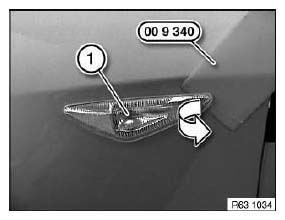
Fig. 14: Identifying Special Tool (00 9 340)
Disconnect plug connection (1).
Remove auxiliary direction indicator (2).
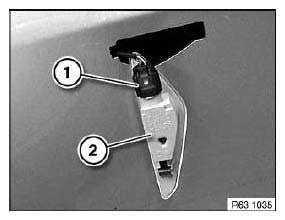
Fig. 15: Identifying Auxiliary Direction Indicator With Plug Connection
READ NEXT:
 Clearance And Side
REMOVING AND INSTALLING/REPLACING FRONT LEFT OR RIGHT SIDE MARKER
Special tools required:
00 9 323.
Necessary preliminary tasks:
Remove front wheel arch cover front section.
NOTE: Minimum object
Fog Lights, Auxiliary
REMOVING AND INSTALLING/REPLACING LEFT FRONT FOG LAMP
Necessary preliminary tasks:
Remove left grille in bumper trim.
Grasp grille through opening.
Disconnect plug connection (1).
Release screws
Rear Light Cluster
REPLACING SOCKET HOUSING FOR LEFT OR RIGHT REAR LIGHT
WARNING: Follow instructions for handling light bulbs (exterior
lights).
Rear light in side panel:
Remove flap in luggage compartment trim panel.
SEE MORE:
Replacing Level Switch For Dynamic Drive Fluid Reservoir
Unscrew nuts.
Remove shims.
Installation:
Replace self-locking nuts.
Fig. 162: Locating Nuts
NOTE: Raise and/or turn fluid reservoir in order to gain better access
to plug
connection.
Disconnect plug connection (1).
Turn level switch (2) through approx. 45º and remove towards bottom.
Fig. 163:
Managing mobile devices
General information
After one-time pairing, the devices are automatically
recognized and reconnected when
standby state is switched on.
After stored content on the SIM card or the
mobile phone, such as contacts, has been
detected, the data is transmitted to the vehicle
and can be used via iD
© 2019-2026 Copyright www.bmwx5info.com
