
BMW X5: Removing And Installing Rear Cabin Monitor (Complete)
BMW X5 (G05) 2019-2026 Service & Repair Manual / Audio, Navigation And Anti-Theft / Video And TV Equipment / Removing And Installing Rear Cabin Monitor (Complete)
Necessary preliminary tasks:
- Remove fresh-air grille in rear cabin.
- Remove trim from rear cabin monitor base at front.
Release screws (1) and remove rear cabin monitor with holder (2).
Disconnect associated plug connections and feed out leads.
Tightening torque.
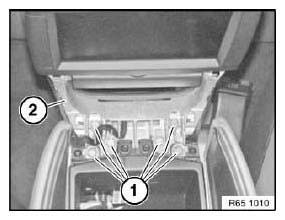
Fig. 39: Identifying Rear Cabin Monitor With Holder
Installation:
Make sure leads are correctly routed on both sides.
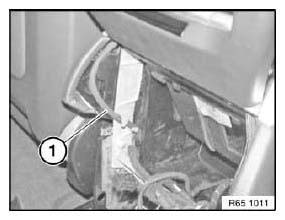
Fig. 40: Identifying Monitor Leads
REMOVING AND INSTALLING/REPLACING TRIM FOR REAR CABIN MONITOR BASE AT FRONT
Special tools required:
- 00 9 340
Using special tool 00 9 340 , unclip trim (1) on both sides.
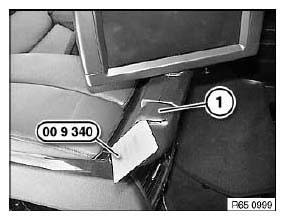
Fig. 41: Identifying Special Tool (00 9 340)
Open armrest (1).
Unclip trim (2) with special tool 00 9 340 and feed out.
Replacement:
Trims may only be replaced in pairs so as to avoid differences in color.
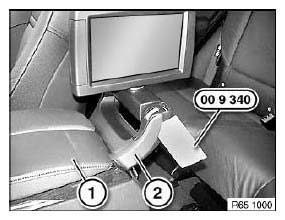
Fig. 42: Identifying Special Tool (00 9 340)
READ NEXT:
 Removing And Installing/Replacing Trim For Rear Cabin Monitor Base
At Rear
Removing And Installing/Replacing Trim For Rear Cabin Monitor Base
At Rear
Special tools required:
00 9 340
Using special tool 00 9 340 , unclip trim (1) on both sides.
Fig. 43: Identifying Special Tool (00 9 340)
Unclip trim (1) with special tool 00 9 340 and remove.
Re
Notes On Scrapping BMW Vehicles With Gas Generators (Central Airbag
Control Unit, Airbag System)
The gas generator is a pyrotechnic component of:
Airbag module
Driver's/passenger airbag
Side airbags
Head airbag
Knee airbag
Belt pretensioner
Belt buckle tensioner
Safety battery te
SEE MORE:
General driving notes
Closing the tailgate
Safety information
Warning
An open tailgate protrudes from the vehicle and
can endanger occupants and other road users
or damage the vehicle in the event of an accident,
braking or evasive maneuvers. In addition,
exhaust fumes may enter the vehicle interior.
There is a risk of
Replacing Exhaust Camshaft Pulse Generator (N52, N52K, N51, N53)
IMPORTANT: Read and comply with notes on protection against
electrostatic damage (ESD
protection).
Necessary preliminary tasks:
Read out fault memory of DME control unit; if necessary, work through
test schedules
If necessary, remove radiator cover
Unlock plug (1) and remove. Release bolt.
R
© 2019-2026 Copyright www.bmwx5info.com
